Average Ratings 0 Ratings
Average Ratings 0 Ratings
Similar Products
-
ROLLERROLLER has a proven history of serving over 2,000 clients spanning 30+ countries, including esteemed brands in the attractions industry such as SkyZone, Altitude, American Dream, Uptown Jungle, Flip Out, WhoaZone, Oxygen, Innoflate, and Jumpsquare. We possess an in-depth understanding of the unique requirements of play centers, family entertainment centers, wake parks, water parks, trampoline parks, theme parks, amusement parks, indoor climbing facilities, children's museums, zoos, aquariums, and more. ROLLER stands out as the leading all-inclusive venue management solution for attraction businesses, equipped with a diverse set of features that amplify revenue and streamline operations. Experience seamless ticketing, efficient point-of-sale systems, advanced membership management, and integrated waivers—all in one robust platform designed to elevate your business.
-
JOpt.TourOptimizerJOpt.TourOptimizer is an enterprise optimization engine for route planning, scheduling, and resource allocation across logistics, transportation, dispatch, and field service operations. It is built for organizations that need to solve complex planning problems under real-world business constraints rather than simple consumer-grade route calculation. The platform supports vehicle routing and scheduling scenarios such as VRP, CVRP, VRPTW, pickup and delivery, multi-depot planning, heterogeneous fleets, and workforce scheduling. JOpt.TourOptimizer can model time windows, working hours, visit durations, capacities, skills and expertise levels, territories, zone governance, overnight stays, alternate destinations, and custom business rules. This makes it suitable for production deployments where feasibility, transparency, and operational reliability matter. It is designed to generate practical plans that help teams balance travel time, service commitments, workload distribution, and operational cost in demanding enterprise environments. The solution is available both as an embedded Java SDK and as a Docker-based REST API with OpenAPI and Swagger support. This allows software vendors, enterprise developers, and system integrators to embed advanced optimization into TMS, ERP, CRM, WMS, dispatch systems, customer platforms, and field service applications. With support for scalable integration and modern service architectures, JOpt.TourOptimizer helps organizations improve planning efficiency, service quality, SLA compliance, transparency, and operational resilience at scale. It also supports enterprise integration strategies that require reproducible optimization runs, structured outputs, and flexible deployment models.
-
KamateraOur comprehensive suite of cloud services allows you to build your cloud server your way. Kamatera’s infrastructure is specialized in VPS hosting. With 24 data centers around the world, including 8 in the US, as well as in Europe, Asia and the Middle East, you can choose from. Our enterprise-grade cloud server can meet your requirements at any stage. We use cutting edge hardware, including Ice Lake Processors, NVMe SSDs, and other components, to deliver consistent performance and 99.95% uptime. With a robust service such as ours, you'll get a lot of great features like fantastic hardware, flexible cloud setup, Windows server hosting, fully managed hosting and data security. We also offer consultation, server migration and disaster recovery. We have a 24/7 live support team to assist you in all time zones. With our flexible and predictable pricing plans, you only pay for the services you use.
-
YodeckNext-generation technology for digital signage professionals Yodeck, a cloud-based digital signage platform, is unbeatable. It powers your screen with dynamic content that instantly engages your target audience. Yodeck makes it easy to create, schedule, and design content from the web. To get your message across to those who matter most to you, use attention-grabbing media such as videos, images and PDF files, Office documents, data dashboards, and social media. It provides enterprise-grade security and control. Yodeck's drag-and-drop editing feature allows users to be creative in organizing content into interesting layouts. Yodeck is proud to offer a unique digital signage solution for businesses of all sizes. This includes local diners as well as global leaders like Delta Airlines, Autodesk and Adobe.
-
ScreencaptScreencapt allows you to record the entire screen or a selected area. You can also record a specific window. Screencapt is the ideal screen recorder because of its flexibility. Using the integrated audio recording you can also add your commentary or system sound directly into the screen recording. This is particularly useful when creating explanation videos or presentations. Screencapt's ability to record a webcam is a special feature. You can now add your comments and reactions to the video. This makes your screen recordings more personal and professional. Screencapt offers advanced options to record the cursor. You can choose to hide the cursor or add special effects to highlight specific actions. This is especially useful for software tutorials and demonstrations where a clear cursor view is required.
-
DbVisualizerDbVisualizer is one of the world’s most popular database clients. Developers, analysts, and DBAs use it to advance their SQL experience with modern tools to visualize and manage their databases, schemas, objects, and table data and to auto-generate, write and optimize queries. It has extended support for 30+ of the major databases and has basic-level support for all databases that can be accessed with a JDBC driver. DbVisualizer runs on all major OSes. Free and Pro versions are available.
-
ManageEngine ADAudit PlusADAudit Plus enhances the security and compliance of your Windows Server environment by delivering comprehensive insights into all operational activities. It offers a detailed overview of modifications made to Active Directory (AD) resources, encompassing AD objects and their respective attributes, group policies, and more. By conducting thorough AD audits, organizations can identify and mitigate insider threats, misuse of privileges, and other signs of potential security breaches, thereby bolstering their overall security framework. The tool enables users to monitor intricate details within AD, including entities such as users, computers, groups, organizational units (OUs), group policy objects (GPOs), schemas, and sites, along with their associated attributes. Furthermore, it tracks user management activities like the creation, deletion, password resets, and alterations in permissions, providing insights into the actions taken, the responsible individuals, the timing, and the originating locations. Additionally, it allows organizations to monitor the addition or removal of users from security and distribution groups, ensuring that access privileges are kept to the necessary minimum, which is critical for maintaining a secure environment. This level of oversight is vital for proactive security management and compliance adherence.
-
BrewPOSBrewPOS is an innovative Windows IoT solution tailored for restaurants, aimed at seamlessly streamlining daily operations. This predominantly wired system operates independently of a server and is delivered fully programmed for immediate use. Among its management capabilities are Payroll, EMV chip transactions, employee activity monitoring, pre-authorized credit card processing, and inventory oversight. Additionally, it offers live training with real trainers, comprehensive reporting, automated discounting, trade account management, gift card processing, ticket splitting, customer head counting, table organization, customer record keeping, and advanced features like void comp discount waste overrides and a theft tracking system. The platform also includes extensive employee permissions, ensuring that every aspect of restaurant management can be handled efficiently and securely. With BrewPOS, restaurant owners can expect a robust tool that enhances both service quality and operational efficiency.
-
WindocksWindocks provides on-demand Oracle, SQL Server, as well as other databases that can be customized for Dev, Test, Reporting, ML, DevOps, and DevOps. Windocks database orchestration allows for code-free end to end automated delivery. This includes masking, synthetic data, Git operations and access controls, as well as secrets management. Databases can be delivered to conventional instances, Kubernetes or Docker containers. Windocks can be installed on standard Linux or Windows servers in minutes. It can also run on any public cloud infrastructure or on-premise infrastructure. One VM can host up 50 concurrent database environments. When combined with Docker containers, enterprises often see a 5:1 reduction of lower-level database VMs.
-
ManageEngine ADManager PlusADManager Plus is an effortless and user-friendly solution for managing and reporting on Windows Active Directory (AD), designed to assist both AD administrators and help desk staff with their daily operations. Featuring a centralized and user-friendly web interface, this software addresses a range of intricate tasks, including the bulk management of user accounts and various AD objects, delegation of role-based access to help desk personnel, and the generation of a comprehensive array of AD reports, many of which are critical for compliance audit purposes. Additionally, this Active Directory tool provides mobile applications that enable AD administrators and technicians to carry out essential user management functions from their smartphones or tablets while on the go. It simplifies the process of creating multiple users and groups in Office 365, managing licenses, establishing Exchange mailboxes, migrating existing mailboxes, setting storage limits, and adding proxy addresses, thereby enhancing overall efficiency. With its robust features, ADManager Plus stands out as a vital asset for organizations aiming to streamline their AD management processes.
Description
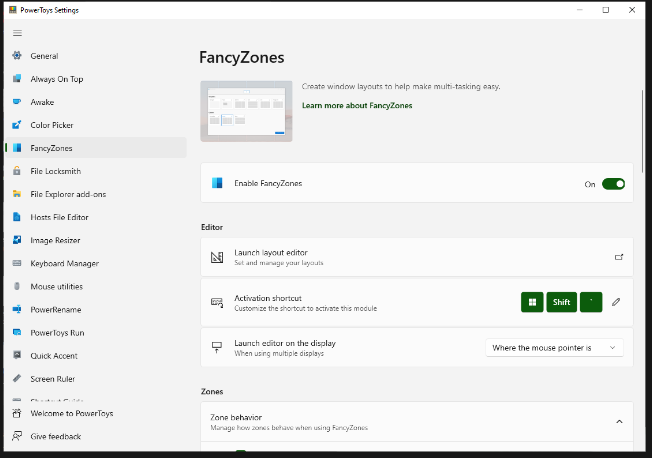
FancyZones serves as a window management tool designed to help users arrange and snap their application windows into optimized layouts, enhancing workflow efficiency and allowing for quick restoration of these layouts. This utility empowers you to specify a series of designated zones on your desktop where windows can be directed. By dragging a window into a predetermined zone or using a designated keyboard shortcut, the respective window automatically resizes and relocates to occupy that zone completely. Additionally, if you have the "Use non-primary mouse button to toggle zone activation" option activated, you can enter zone selection mode by simply clicking the secondary mouse button. When two zones are positioned next to each other, a window can be adjusted to span the combined area of both zones, effectively rounding up to the smallest rectangle that encompasses the two. As you maneuver the mouse cursor close to the shared boundary of two zones, both zones become active at the same time, giving you the flexibility to drop the window into either or both. Moreover, you can drag the window until it activates one zone and then, by pressing and holding the control key while continuing to drag, select multiple zones to expand your layout options. This feature significantly streamlines the process of organizing your desktop workspace efficiently.
Description
How TEAMCAL AI Works:
By Addressing Key
Scheduling Challenges
TEAMCAL AI addresses the critical scheduling challenges that arise when collaborating with decentralized teams and customers, which often hinder productivity.
Scheduling is often manual, making it cumbersome and time-consuming
Scheduling with clients and third parties involves constant back-and-forth
Scheduling across time zones and teams is a hassle
And there is one more thing, everyday apps like Zoom, Slack, etc. lack scheduling features.
TEAMCAL AI works as a web application, an iOS app, and also integrates with your favorite everyday apps like Zoom, Outlook, Gmail, Slack, and more. TEAMCAL AI is an all-in-one team scheduling software that has 8 components.
ADI, TEAMCAL AI powered Meetbot
Schedule Meeting with Third parties
Team Scheduling Across Time Zones
Integrate Seamlessly with Everyday Apps
Share Individual and Team Meeting Links
Mobile Access
Advanced Features for Recruiters
Timeboxing
Meeting Insights
API Access
Has API
API Access
Has API



Integrations
Android
Apple iOS
Cisco Webex
Gmail
Microsoft Outlook
Microsoft Teams
Slack
Zoom
Integrations
Android
Apple iOS
Cisco Webex
Gmail
Microsoft Outlook
Microsoft Teams
Slack
Zoom
Pricing Details
Free
Free Trial
Free Version
Pricing Details
$15 per month per user
Free Trial
Free Version
Deployment
Web-Based
On-Premises
iPhone App
iPad App
Android App
Windows
Mac
Linux
Chromebook
Deployment
Web-Based
On-Premises
iPhone App
iPad App
Android App
Windows
Mac
Linux
Chromebook
Customer Support
Business Hours
Live Rep (24/7)
Online Support
Customer Support
Business Hours
Live Rep (24/7)
Online Support
Types of Training
Training Docs
Webinars
Live Training (Online)
In Person
Types of Training
Training Docs
Webinars
Live Training (Online)
In Person
Vendor Details
Company Name
Microsoft
Country
United States
Website
learn.microsoft.com/en-us/windows/powertoys/fancyzones
Vendor Details
Company Name
TEAMCAL AI
Founded
2020
Country
United States
Website
teamcal.ai/
Product Features
Product Features
Scheduling
Alerts/Notifications
Appointment Scheduling
Automated Scheduling
Calendar Management
Class Scheduling
Employee Scheduling
Facility Scheduling
Group Scheduling
Interview Scheduling
Meeting Room Booking
Multi-Location
Online Scheduling
Payment Processing
Real-time Scheduling
Reservations
Resource Scheduling
Room Booking Management



