Average Ratings 0 Ratings
Average Ratings 0 Ratings
Similar Products
-
EurekosLearning management systems are good for training employees but often fail to address the unique needs of training customers & partners, as well as customers' customers & partners. Eurekos is a leading European customer education specialist, offering innovative training software solutions for businesses and non-profit organizations with a need for external training, certification or accreditation. Eurekos offers a complete set of tools to create and deliver training that cover the entire customer journey: before the sale, during onboarding and ongoing. Eurekos has everything for rapid onboarding, advanced certification, eCommerce, unlimited brand portals, complex organizational structures and integrated content development all under the highest privacy & security standards (ISO7IEC 27001 & 27701). We are constantly reinvesting back into our software to bring our clients the most current features available on the LMS market.
-
ActCAD SoftwareACTCAD is suitable for professional drawings creation for Architects, Structural Engineers, Civil Engineres, Mechanical Drawings, Electrical drawings, interior design, tool design, machine designs etc.ActCAD is professional grade 2D Drafting and 3D Modeling CAD software which works in dwg and dxf file formats. Most affordable cad software.ActCAD is a native dwg/dxf cad software suitable for professional 2D drafting and 3D modeling projects. ActCAD is trusted by over 30000 users in over 103 countries for more than 10 years. The interface, commands, icons, dialogs, shortcuts etc. are very much similar to other popular cad software tools available in market. Flexible license types available even for single license. There is no learning for existing cad users while saving 80% of the costs.ActCAD offers free email technical support without any limitations. ActCAD can be fully customized and programs can be developed using our free API toolkit. It supports popular programming languages like , lisp dcl, .net, C++ etc. Apart from all regular commands, ActCAD offers many productive tools like pdf to cad converter, Block libraries, Image to Cad converter, handling point sets between Cad and Excel and many more.
-
EasySendEasySend simplifies the creation of digital customer journeys by allowing businesses to automate customer data intake, document management, and approval processes. Whether it’s for claims, loans, or quotes, EasySend’s no-code platform helps companies digitize their workflows, eliminating manual tasks and speeding up processes. With secure integrations, seamless e-signatures, and compliance with global data regulations, EasySend offers a robust solution for digital transformation. Trusted by Fortune 500 companies, it empowers businesses to offer dynamic, branded customer experiences while maintaining security and compliance across all stages of the journey.
-
CrankWheelCrankWheel allows you to share your screen while on a call. This makes it easy to create engaging presentations. You can send a link via email or SMS to the viewer and they will be able to view it in any browser on any device. CrankWheel was designed for simplicity and can be shared with customers to facilitate business deals. CrankWheel can be used to complement calls from insurance agents, mortgage advisors and solar advisors as well as educators and customer support specialists. CrankWheel is easy to integrate with websites and allows users to add a Demo button to receive quick notifications. We can show you if they are paying attention. Our Chrome Extension has enabled over 50,000 users to share their screens with prospects, regardless of their technical skills or device choice. CrankWheel can be used on old browsers and obscure devices, even with poor network connections. It works on Mac, Android, iOS, Blackberries, Internet Explorer, and Android.
-
Checksum.aiEngineering teams shipping with AI have a new bottleneck: validation. Code output has accelerated. Quality hasn't. Checksum closes the gap. Checksum is a continuous quality platform with a suite of AI agents that handle testing end-to-end, at every stage of the development lifecycle. Where most tools wait for a human to trigger them, Checksum runs autonomously in the background, generating tests, executing them, and repairing failures without manual intervention. Seventy percent of test failures are resolved automatically through real-time auto-recovery. The platform covers every layer: end-to-end UI flows via Playwright, API endpoint chains, and targeted CI tests scoped to exactly what changed in a PR. All tests land as real code in your repository and are delivered as standard Playwright, owned by your team. Checksum is fine-tuned on 1.5+ million test runs and integrates natively with Cursor, Claude Code, and 100+ AI coding agents. Type /checksum and your coding agent's output gets tested before it ever reaches review. Generation and healing happen on Checksum's cloud infrastructure which means no LLM tokens consumed, no local resources required. The result: test suites that stay green as the product evolves, fewer regressions reaching production, and release confidence that scales alongside AI output.
-
ClickLearnClickLearn simplifies complex business processes using popular software. You can create multi-format learning materials in any language and publish them to a 24/7 learning portal with just one click. A video walkthrough of the process, with narration in your preferred language. Put your learning to the test. This interactive simulation of your workplace allows you to test your knowledge without any hints. Interactive simulation of your workplace environment that guides you through the process. This guide is step-by-step. ClickLearn wrote this guide with perfectly cropped screenshots. ClickLearn Assist can be your go-to helper when you are stuck, need process help, or want to try a new process in the live system. You don't have to worry about making another mistake. All your learning materials can be auto-translated with a click of a button
-
Process StreetProcess Street is the Compliance Operations Platform built for teams that need to move fast without breaking standards. It combines document control, workflow automation, and AI-powered oversight in a single system so every policy is followed, every step is tracked, and every audit is effortless. Unlike legacy GRC tools or static SOP docs, Process Street turns compliance into a living system. Policies are documented in governed, version-controlled Pages. Those policies are executed through dynamic workflows with built-in task assignment, approvals, and forms. Every action is logged, monitored, and optimized in real time by Cora, our AI compliance agent. Used across industries like financial services, real estate, healthcare, and manufacturing, Process Street helps teams automate employee onboarding, streamline audits, manage policy updates, enforce vendor reviews, and run critical processes at scale. No code required. No micromanagement. Just proof that work gets done right, every time. Companies like Salesforce, Colliers, Drift, and Hartford Healthcare trust Process Street to eliminate busywork, improve operational visibility, and reduce compliance risk across the business. With native integrations, role-based access, audit trails, and ISO-aligned workflows, it is the platform that makes compliance a competitive advantage. From onboarding to audits, Process Street is how high-stakes teams enforce standards, automate execution, and prove compliance by default.
-
DriveStrikeDriveStrike is simple to use, implement, and manage. DriveStrike allows you to perform remote wipe, remote lock, or remote locate commands on any platform. Mobile device management MDM for mobile platforms. Integrated drive encryption support. Our support team is available to answer any questions, help you install our services, or manage your account. It's never been easier to protect your data and devices. We are happy to answer any questions you may have or help you understand how to best protect your data. Protect your business with a device- and data protection platform that keeps all devices protected with a single solution. Your Workstations, iPads and iPads, Smartphones as well as Tablets, Tablets, Tablets, and Laptops will be protected, organized, secure, & protected.
-
PipefyPipefy is a low-code Business Orchestration and Automation Technologies (BOAT) platform designed to act as a modern middleware layer for the enterprise stack. Rather than replacing existing Systems of Record (SORs) like SAP, Oracle, or Salesforce, Pipefy wraps them in an agile orchestration layer. This architecture allows technical teams to modernize legacy operations and extend the life of core systems without the risks associated with "rip and replace" projects. Pipefy provides the infrastructure to sanitize data inputs, manage complex business logic, and orchestrate API calls between fragmented endpoints. Technical & Architectural Highlights: • Adaptive Governance Framework: Pipefy solves the "Shadow IT" problem by establishing IT-sanctioned "Safe Zones." Business users can build workflows within these guardrails, while IT retains control over critical data, integrations, and permissions via a centralized console. • Agentic AI Engine (BYOLLM): The platform features a governable AI Agent Studio. Unlike "black box" solutions, Pipefy supports a Bring Your Own LLM approach, allowing enterprises to integrate preferred models (Azure OpenAI, AWS Bedrock) securely to automate document analysis (OCR) and decision-making. • Robust Connectivity: Built with an API-first philosophy, Pipefy offers a GraphQL API, Webhooks, and enterprise-grade iPaaS capabilities to ensure seamless data interoperability across the stack. • Security & Compliance: Engineered for regulated industries, the platform is ISO 27001, ISO 27701, and SOC2 Type II certified, supporting compliance with GDPR and SOX standards. Pipefy empowers IT leaders to eliminate technical debt and clear development backlogs by safely delegating low-complexity builds to business units.
-
MyQAt MyQ, the core belief is that print solutions should be automated, personalized, and easy to use, allowing people to focus on what matters most in their daily work. This principle is reflected in MyQ’s approach to our product design, combining intuitive user experiences with strong data security and efficient document workflows. MyQ’s print management solutions strengthen document security while helping organizations reduce costs, save time, and lower their environmental impact.
Description
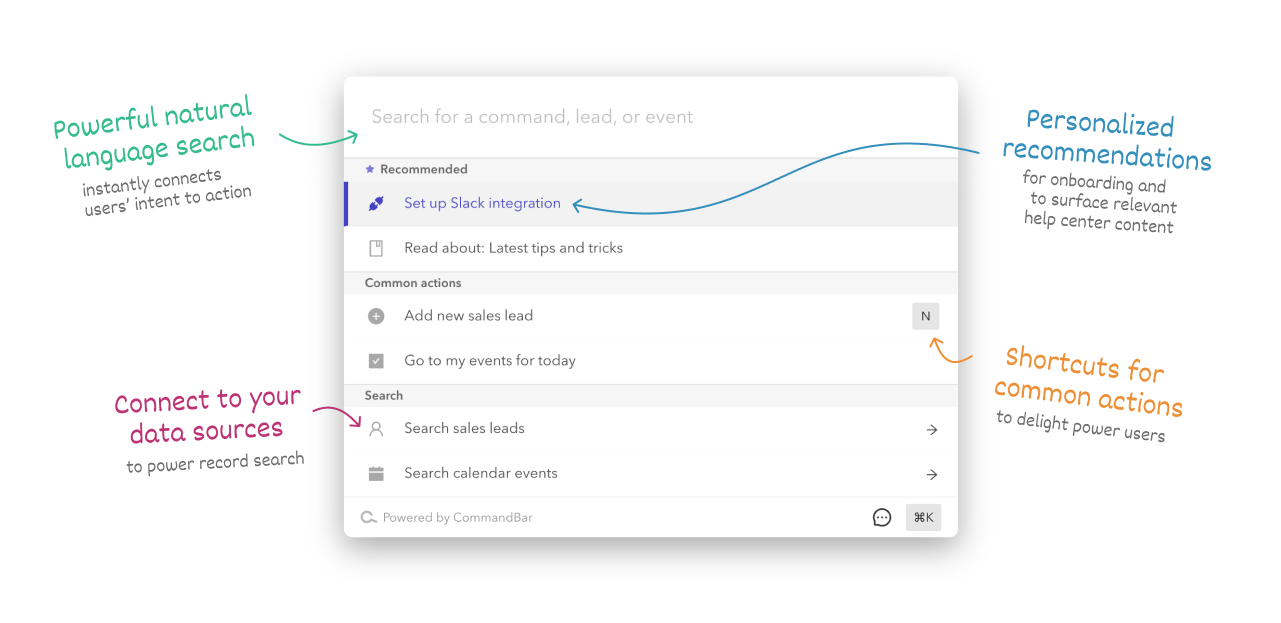
CommandBar simplifies the learning curve for your app, leading to higher conversion rates for new users and minimizing the need for extensive onboarding. As users become familiar with your app, they will find it easier to navigate and utilize its features, which in turn will reduce the volume of support inquiries. Enthusiastic users will appreciate CommandBar for its ability to streamline frequent tasks and enhance their efficiency. The cmd+k interface consolidates all functionalities of your app into a single, searchable platform. You can easily copy a code snippet, create commands using our intuitive low-code Editor, and deploy them seamlessly. The Editor allows for rapid prototyping and deployment, enabling you to introduce new commands without relying on an engineering team. CommandBar is designed to perform exceptionally well across all major desktop browsers, operating systems, and web technologies. With performance at its core, every interaction feels remarkably instantaneous, giving users the sensation of a faster, more responsive experience akin to using a new computer. This seamless integration not only enhances user satisfaction but also fosters a deeper engagement with your app's features.
Description
Komandi serves as an essential utility for both developers and system administrators, facilitating the insertion, favoriting, copying, and execution of commands. This versatile tool enables users to manage their frequently utilized CLI commands while identifying potentially hazardous commands to prevent unintended execution. With the power of AI, Komandi allows for the generation of terminal commands directly from natural language prompts, making it easier to communicate with your system. Users can execute commands immediately or target specific directories for execution, streamlining their workflow across multiple platforms, including macOS, Windows, and Linux. The application also offers a search function to quickly find and execute commands using keyboard shortcuts, enhancing user efficiency. For those interested in trying it out, Komandi is available for free download from the website, but users are limited to a 7-day trial period before they must purchase a license to continue enjoying its features. This makes Komandi a valuable tool for anyone looking to optimize their command-line experience and effortlessly manage their command repertoire.
API Access
Has API
API Access
Has API


Integrations
GNOME Terminal
PowerShell
Windows Terminal
iTerm2
Pricing Details
$149 per month
Free Trial
Free Version
Pricing Details
$19 one-time payment
Free Trial
Free Version
Deployment
Web-Based
On-Premises
iPhone App
iPad App
Android App
Windows
Mac
Linux
Chromebook
Deployment
Web-Based
On-Premises
iPhone App
iPad App
Android App
Windows
Mac
Linux
Chromebook
Customer Support
Business Hours
Live Rep (24/7)
Online Support
Customer Support
Business Hours
Live Rep (24/7)
Online Support
Types of Training
Training Docs
Webinars
Live Training (Online)
In Person
Types of Training
Training Docs
Webinars
Live Training (Online)
In Person
Vendor Details
Company Name
CommandBar
Country
United States
Website
www.commandbar.com
Vendor Details
Company Name
Komandi
Website
komandi.app/
Product Features
Digital Adoption Platforms
Audience Segmentation
Content Creation
Contextual Guidance
Data Validation
In-App Training
Launch Management
Multi-Language
Self Service Tools
Surveys & Feedback
User Onboarding
UX
Animation
For Mobile
For Websites
Heatmaps
Prototyping
Screen Activity Recording
Unmoderated Testing
Usability Testing
User Journeys
User Research

