Average Ratings 0 Ratings
Average Ratings 0 Ratings
Similar Products
-
ScreencaptScreencapt allows you to record the entire screen or a selected area. You can also record a specific window. Screencapt is the ideal screen recorder because of its flexibility. Using the integrated audio recording you can also add your commentary or system sound directly into the screen recording. This is particularly useful when creating explanation videos or presentations. Screencapt's ability to record a webcam is a special feature. You can now add your comments and reactions to the video. This makes your screen recordings more personal and professional. Screencapt offers advanced options to record the cursor. You can choose to hide the cursor or add special effects to highlight specific actions. This is especially useful for software tutorials and demonstrations where a clear cursor view is required.
-
ShiftShift is your power browser. The only browser to merge all your applications into one beautiful window. Connect all of your email accounts and manage all your apps from one powerful window. Streamline everything you do online when you install Shift and access thousands of apps without leaving your browser. Tired of juggling apps, hundreds of tabs, and multiple accounts? Most browsers make that feel messy, Shift makes it simple.
-
Repair-CRMSay goodbye to expensive, inflexible software solutions and hello to Repair-CRM—an affordable, tailored system designed specifically for small repair businesses. At just $89/month for up to 5 users, with no annual contracts or hidden fees, Repair-CRM offers a hassle-free way to streamline your operations. Seamlessly integrate with QuickBooks Online, and import your client and product data in just 5 minutes. Dispatch jobs quickly and efficiently, while keeping track of every asset—whether it’s HVAC units, printers, or water systems—with complete service history at your fingertips. The intuitive online booking portal integrates smoothly with your website, enabling clients to choose the exact asset they need repaired, making scheduling easier than ever. Technicians benefit from GPS tracking, clock-in/out features, and the ability to capture before-and-after photos on-site, providing real-time updates. Repair-CRM is the perfect balance of affordability, adaptability, and convenience, empowering your repair business to run smoothly without breaking the bank. It’s built for you—helping your business grow, while keeping costs low.
-
Files.com6,000+ companies trust Files.com to automate and secure business critical transfers. We obsess about security, compliance, reliability, and performance so your critical business processes just work every time. Easily manage any transfer flow without writing scripts or code, and onboard workloads and partners effortlessly. We support standard file transfer protocols (FTP, SFTP, AS2) for working with external partners and also provide native apps for high performance internal transfers. As a fully Cloud-Native SaaS, there are no servers for you to buy or maintain, there is no installation required, and high availability and redundancy are built in and free. Our InfoSec Program is audited annually by Kirkpatrick Price, a leading information security CPA firm. Our audit covers the scope of the entire Files.com business (not just datacenter operations) and names Files.com specifically. Beware of smaller competitors who try to pass off someone else’s audit as their own. Technical capabilities include encryption at-rest and in-transit, four types of two-factor authentication, nine enterprise identity (SSO) integrations, configurable password and session policies, and a perfect “A+” score from Qualys SSL Labs.
-
Secure EraserSecure Eraser: Secure Data Deletion, Shredders Your Files & Folders. Just because it has been removed from your hard drive doesn't mean that it is gone forever. Anyone can restore the information as long as it was not overwritten. It becomes more difficult if the computer has been resold, or given away. Secure Eraser employs the most well-known method of data disposal. It overwrites sensitive information so that it cannot be recovered even with specialized software. Our award-winning solutions for permanently destroying data eliminate cross-references that may leave traces of deleted files within the allocation table of your hard disk. This Windows software is easy to use and can overwrite sensitive data up to 35 times, regardless of whether they're files, folders or drives, recycle bins, or traces of surfing. You can also delete files that you have already deleted but not for good.
-
Comet BackupStart running backups and restores in less than 15 minutes! Comet is a fast, secure all-in-one backup platform for businesses and IT providers. You control your backup environment and storage destination (local, Wasabi, AWS, Google Cloud Storage, Azure, Backblaze, or other S3 storage providers). Our software supports businesses across 120 countries in 13 languages. Test drive Comet Backup with a 30-day FREE trial!
-
Thinfinity WorkspaceThinfinity Workspace 7.0's Technical Highlights: - Progressive Web App (PWA) technology for a seamless user experience - Integrated Thinfinity VNC, VirtualUI, and z/Scope for maximum versatility - HTML5 terminal emulation supporting DEC terminals, TN 5220, and TN 3270 protocols - Robust enterprise-grade audit logs for security and compliance management - Proprietary VNC protocol for real-time monitoring and troubleshooting IMPROVE USER EXPERIENCE - Deliver business-critical apps, desktops and files from a single web portal. - Provide simplified remote browser access for your users, while confining them to only the resources that they need. SIMPLIFY IT AND AVOID VPNs - Forget traditional VPN deployments and complexities. - Enable access from Chromebooks, mobile devices or any computer with a Web Browser. Zero setup. KEEP YOUR BUSINESS SECURE - Use enterprise-grade encrypted connections. - Integrate with your existing and external identity platforms. - Apply 2FA or MFA policies with all identity providers.
-
Code-Cube.ioCode-Cube.io is a comprehensive marketing observability solution that ensures the accuracy and reliability of tracking data across digital platforms. It continuously monitors tags, dataLayers, and conversion events to detect issues the moment they occur. By providing real-time alerts, the platform allows teams to quickly respond to tracking failures before they affect campaign performance or reporting accuracy. Its automated auditing capabilities remove the need for time-consuming manual QA processes, saving valuable resources. With features like Tag Monitor, users can oversee tag behavior across both client-side and server-side environments with full transparency. DataLayer Guard further strengthens data integrity by validating events, parameters, and values in real time. The platform helps businesses avoid wasted ad spend caused by incorrect or incomplete data signals. It also supports multi-domain tracking, ensuring consistency across complex digital ecosystems. Code-Cube.io is trusted by global brands to maintain high-quality marketing data at scale. Ultimately, it enables organizations to optimize performance and make confident, data-driven decisions.
-
MobiOffice (formerly OfficeSuite)MobiOffice (formerly OfficeSuite) is an easy-to-use office suite alternative, used by over 250 million users across 195 countries. Available on Windows, Android, iOS, and macOS, MobiOffice includes MobiDocs, MobiSheets, and MobiSlides. MobiOffice helps you manage text documents, spreadsheets, and presentations with ease. It's compatible with all major file formats including Microsoft Office (DOCX, ODT, PPTX), Google (Docs, Sheets, Slides), Apple iWork, and more. Explore each component: MobiDocs: Create and modify documents with comprehensive formatting options. MobiSheets: Simplify data management and analysis to visualize insights and generate reports effortlessly. MobiSlides: Craft impressive presentations with customizable templates and multimedia capabilities. MobiOffice integrates with MobiDrive, MobiSystems’ cloud storage solution for easy document saving and synchronization. Try it free for 7 days to see how this office suite meets your needs. Optimized for all major platforms, MobiOffice’s components - MobiDocs, MobiSheets, and MobiSlides - are available as a complete suite or as standalone apps on Windows, delivering tailored and affordable solutions that suit individual needs.
-
Nutrient SDKNutrient provides an extensive solution for all your PDF requirements, delivering tools that seamlessly operate PDF features across any platform. 1. SDK: Incorporate advanced PDF functionality into iOS, Android, Windows, web, or any cross-platform technology, supplying abilities like PDF viewing, annotation, collaboration, and beyond. 2. Libraries: Employ our powerful .NET and Java libraries to enhance your backend applications with batch processing of redactions and PDF forms, OCR'd scanned text, and PDF document editing, all directly from your application server. 3. Processor: Our agile PDF microservice, Processor, enables rapid generation of PDFs from HTML, including HTML forms, as well as Office-to-PDF conversions, OCR, redaction, and XFDF combining and exporting. 4. PDF API: Take advantage of our hosted PDF API to generate, convert, and alter PDF documents in your workflows. We handle the development and server management, freeing you up to concentrate on your business. At Nutrient, we're not just a tool; we're a committed ally in your success. Gain direct contact with our engineers for expert guidance, utilize comprehensive examples to simplify integration, and make the most of our top-tier documentation.
Description
BetterSnapTool simplifies the organization of your window layouts by allowing you to drag them to the corners or edges of your screen for easy resizing and positioning. This functionality lets you effortlessly maximize windows, arrange them side by side, or resize them to occupy a quarter of the display. For those seeking additional flexibility, BetterSnapTool now offers the option to create personalized snap areas anywhere across your screen. In addition to these features, users can benefit from custom keyboard shortcuts, tailored actions for window buttons, and the ability to move or resize windows while holding down a specific key, among other helpful tools. With such a variety of options, BetterSnapTool enhances productivity by making window management more intuitive and efficient.
Description
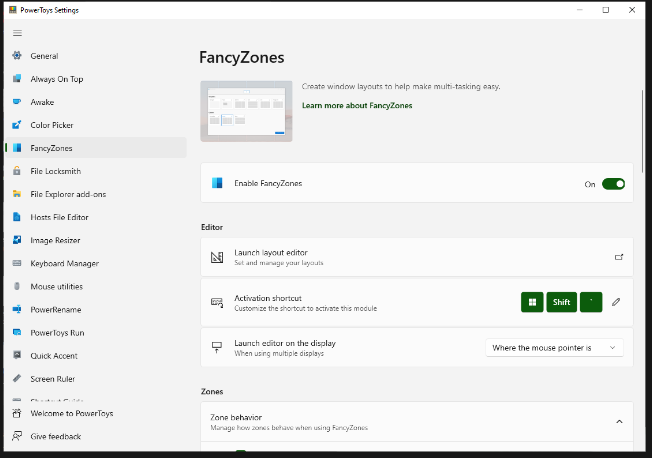
FancyZones serves as a window management tool designed to help users arrange and snap their application windows into optimized layouts, enhancing workflow efficiency and allowing for quick restoration of these layouts. This utility empowers you to specify a series of designated zones on your desktop where windows can be directed. By dragging a window into a predetermined zone or using a designated keyboard shortcut, the respective window automatically resizes and relocates to occupy that zone completely. Additionally, if you have the "Use non-primary mouse button to toggle zone activation" option activated, you can enter zone selection mode by simply clicking the secondary mouse button. When two zones are positioned next to each other, a window can be adjusted to span the combined area of both zones, effectively rounding up to the smallest rectangle that encompasses the two. As you maneuver the mouse cursor close to the shared boundary of two zones, both zones become active at the same time, giving you the flexibility to drop the window into either or both. Moreover, you can drag the window until it activates one zone and then, by pressing and holding the control key while continuing to drag, select multiple zones to expand your layout options. This feature significantly streamlines the process of organizing your desktop workspace efficiently.
API Access
Has API
API Access
Has API


Integrations
No details available.
Integrations
No details available.
Pricing Details
No price information available.
Free Trial
Free Version
Pricing Details
Free
Free Trial
Free Version
Deployment
Web-Based
On-Premises
iPhone App
iPad App
Android App
Windows
Mac
Linux
Chromebook
Deployment
Web-Based
On-Premises
iPhone App
iPad App
Android App
Windows
Mac
Linux
Chromebook
Customer Support
Business Hours
Live Rep (24/7)
Online Support
Customer Support
Business Hours
Live Rep (24/7)
Online Support
Types of Training
Training Docs
Webinars
Live Training (Online)
In Person
Types of Training
Training Docs
Webinars
Live Training (Online)
In Person
Vendor Details
Company Name
BetterSnapTool
Website
folivora.ai/bettersnaptool
Vendor Details
Company Name
Microsoft
Country
United States
Website
learn.microsoft.com/en-us/windows/powertoys/fancyzones



