Average Ratings 0 Ratings
Average Ratings 0 Ratings
Similar Products
-
AssembledAssembled combines AI agents with advanced workforce management to give support teams the speed, flexibility, and control they need to excel. Our platform streamlines staffing for both in-house and outsourced teams, delivers forecasts with over 90% accuracy, and automates more than half of customer conversations. Whether it’s chat, email, or voice, Assembled orchestrates every interaction, allocating work between AI and human agents in real time. Leading brands like Stripe, Canva, and Robinhood rely on Assembled to boost performance and turn support into a growth driver. Key capabilities include scheduling, forecasting, live performance monitoring, vendor management, AI-powered chat, voice, and email agents, plus an AI Copilot that provides instant guidance, suggested responses, and rapid action tools for agents.
-
Deltek Replicon TimeReplicon is a cloud-based platform built to manage the complex demands of time tracking, project costing, resource management, and labor compliance, no matter your industry or team size. With intelligent, AI-powered timesheets and an intuitive user interface, Replicon helps you automate time capture, reduce manual effort, and ensure data accuracy across all departments. Whether you're running client-facing projects, internal operations, or hybrid teams across global locations, Replicon provides full visibility into work hours, cost allocation, and task progress. Built-in project costing, configurable workflows, and compliance tools help you manage wage rules, overtime, location-based labor laws, and approval hierarchies with ease. Replicon also includes robust forecasting and reporting features to help managers make informed decisions about staffing, delivery timelines, and project profitability. With integrations for ERP, CRM, and payroll systems, it creates a centralized view of people, projects, and performance. Ideal for operations, HR, IT, finance, and project management teams, Replicon transforms how businesses track time, manage labor, and drive results, with real-time intelligence and automation at its core.
-
JOpt.TourOptimizerJOpt.TourOptimizer is an enterprise optimization engine for route planning, scheduling, and resource allocation across logistics, transportation, dispatch, and field service operations. It is built for organizations that need to solve complex planning problems under real-world business constraints rather than simple consumer-grade route calculation. The platform supports vehicle routing and scheduling scenarios such as VRP, CVRP, VRPTW, pickup and delivery, multi-depot planning, heterogeneous fleets, and workforce scheduling. JOpt.TourOptimizer can model time windows, working hours, visit durations, capacities, skills and expertise levels, territories, zone governance, overnight stays, alternate destinations, and custom business rules. This makes it suitable for production deployments where feasibility, transparency, and operational reliability matter. It is designed to generate practical plans that help teams balance travel time, service commitments, workload distribution, and operational cost in demanding enterprise environments. The solution is available both as an embedded Java SDK and as a Docker-based REST API with OpenAPI and Swagger support. This allows software vendors, enterprise developers, and system integrators to embed advanced optimization into TMS, ERP, CRM, WMS, dispatch systems, customer platforms, and field service applications. With support for scalable integration and modern service architectures, JOpt.TourOptimizer helps organizations improve planning efficiency, service quality, SLA compliance, transparency, and operational resilience at scale. It also supports enterprise integration strategies that require reproducible optimization runs, structured outputs, and flexible deployment models.
-
DeskTimeDeskTime is a high-performance, 100% automated time tracking and productivity management solution designed for modern IT teams, software houses, and remote organizations. Unlike traditional trackers that rely on manual "Start/Stop" timers, DeskTime runs silently in the background, logging computer activity from the moment of boot-up to ensure zero data loss and absolute payroll accuracy. ⏱️ 🚀 Key Technical Features: ✅ Fully Automated Tracking: Eliminate manual timesheets. DeskTime captures arrival, departure, and total work hours automatically based on device activity. ⚡ ✅ Productivity Profiling: Categorize URLs, applications, and document titles as Productive, Unproductive, or Neutral. Calculate real-time efficiency scores for individuals and teams. 📈 ✅ Advanced Resource Management: Integrated Shift Scheduling and an Absence Calendar allow HR and team leads to manage leave, vacations, and staffing within a single interface. 📅 ✅ Project & Cost Analysis: Track billable hours at the project and task level. Monitor budget burn rates and export precise reports for client invoicing or CapEx/OpEx accounting. 💸 ✅ Offline Time Logging: Capture time spent in meetings or on-site visits via manual entries or the dedicated mobile app for Android and iOS. 📱 ✅ Enterprise-Grade Security: DeskTime is GDPR compliant and ISO 27001 certified. Features include two-factor authentication (2FA), data encryption at rest and in transit, and optional blurred screenshots to protect employee privacy. 🔒 🛠️ Built for Integration: Seamlessly sync your workflow with top-tier project management and communication tools, including: ⚙️Jira, GitLab, Trello, and Asana. ⚙️Google and Outlook Calendars. ⚙️Custom API for bespoke internal tool integration.
-
Monitask🚀 Supercharge Your Team's Productivity! 🚀 Introducing the ultimate productivity hack for the modern workforce. Whether your squad is crushing it in the office, remote, or rocking that hybrid life, we've got you covered. 📊 What's in the box? Smart Time Tracking: Auto clock-in/out. No more "I forgot" excuses! Random Screenshots: Catch those Insta-scrolling moments Web Detective: Know if they're coding or... "coding" 😉 Real-time Mission Control: See who's winning at work Ninja Mode: Stealth monitoring for the win Perfect for: Startups, agencies, outsourcing pros, and corporate giants 💡 Why it's awesome: Turn productivity data into team superpowers Spot workflow kryptonite and zap it Keep it ethical: Privacy for employees, insights for you 🕵️ Ninja Mode: Psst! Our stealth feature lets you observe natural work habits. It's like having a productivity crystal ball! 🔒 Fort Knox-level security included. Because we're paranoid, so you don't have to be. Ready to transform your team into productivity superheroes? Let's go! 🦸♂️🦸♀️
-
PolyPMPolyPM is a Polygon Software integrated enterprise resource planning (ERP), and product lifecycle management solution (PLM). PolyPM is a solution for small- to medium-sized apparel companies. It allows them to integrate all aspects, including the supply chain, product development, and production processes. They can also instantly access all style and manufacturing information from anywhere in the world. This allows businesses to reduce time-to-market and incur lower development costs. It also improves customer service and worker productivity.
-
SynerionSynerion is workforce management software built for organizations that need reliable, configurable, and technically sound tools to manage employee time, scheduling, and labor costs. Unlike lightweight apps or rigid legacy systems, Synerion focuses on precision and adaptability. Time can be captured through biometric clocks (fingerprint, facial recognition), proximity or card readers, mobile devices with geofencing, web browsers, or tablet kiosks. Each punch is validated in real time against rules for overtime, shift differentials, union agreements, and custom premiums, reducing downstream payroll exceptions. Offline support with automatic sync ensures data is never lost. For developers and IT teams, Synerion offers a modern REST API, webhook support, and more than 100 prebuilt connectors to leading payroll, ERP, and HR platforms. Integration isn’t a CSV shuffle — data flows bi-directionally with support for SSO via SAML and OAuth. Audit trails, role-based permissions, encryption in transit, and configurable data-retention policies provide the security and compliance required by enterprise IT. Managers gain centralized scheduling tools that can auto-assign shifts, handle rotations, balance skills across teams, and highlight coverage gaps. Labor allocation down to job, project, or cost center levels makes reporting and charge-backs straightforward. Finance and operations teams get dashboards that track hours, overtime, and costs in real time, with exportable audit-ready reports.
-
Descartes Fleet ManagementDescartes Fleet Management is a comprehensive delivery management solution built to maximize fleet efficiency and optimize the utilization of mobile resources. By leveraging advanced route optimization technology, it enables businesses to complete more deliveries with fewer vehicles and less mileage, lowering costs and environmental impact. The platform integrates seamlessly with mobile devices, providing real-time tracking, performance insights, and ensuring compliance with regulations. It also supports dynamic appointment scheduling, making route planning more flexible and productive for field workers. Descartes empowers companies to enhance customer service through better delivery accuracy and timeliness. The system improves overall operational efficiency by streamlining dispatch and reducing wasted resources. It is ideal for businesses seeking to scale delivery operations while maintaining tight control. Descartes offers a powerful toolset for smarter, greener, and more cost-effective fleet management.
-
RunnRunn is a real-time resource management platform with integrated time tracking and powerful forecasting capabilities. Intuitively plan projects and schedule resources with allocations, project phases, milestones, and time off. Flick between monthly, quarterly and half-yearly views to plan for the short and long term. Get a dynamic bird’s-eye view of your entire organization to manage capacity, workload and availability changes as you create your plans. Runn makes resource management dynamic and visual from a single, shared view. Drill into different roles, teams and tags to compare trends and understand which groups are overbooked. Plan out tentative projects to see how plans might change if work gets confirmed. Track projects, view forecasts, and get relevant metrics within Runn. Get insights like utilization, project variance, and overall financial performance. Use Runn’s built-in timesheets to monitor project progress. Runn integrates with Harvest, WorkflowMax, and Clockify. With the API, build your own integrations to connect Runn with your favorite tools.
-
CareermindsCareerminds helps organizations support their people at every stage of the talent lifecycle through outplacement services, career transition, talent solutions, and job architecture. We partner with HR and business leaders to navigate workforce change, enable growth, and build resilient, future-ready organizations. Founded in 2008, Careerminds operates across 80 languages and 100+ countries, combining global scale with a personalized, high-touch experience. Our unique delivery methodology blends advanced technology, workforce intelligence, and one-to-one coaching to deliver scalable, measurable results. Career transition Outplacement & Executive Outplacement Services: Data-driven outplacement services that help employees transition faster while supporting employers with measurable outcomes, cost efficiency, and brand protection. Workforce Redeployment: Redeployment services that enable internal mobility by aligning skills to business needs, reducing attrition and supporting agility. Job architecture: Career Frameworks: A solution that creates role clarity, defines skill expectations, and supports internal mobility and long-term workforce planning. Workforce Intelligence: A data-driven platform offering insight into skills, roles, and talent trends to support workforce planning and decision-making. Career Enablement: A modern career enablement tool that gives employees visibility into career paths and ownership of their development. Talent solutions: Career Development: A career development program that help employees build skills, grow in their roles, and prepare for future opportunities. Executive & Leadership Coaching: Executive and leadership coaching services that empower leaders to navigate change, strengthen performance, and drive sustainable growth.
Description
The Ascent WorkZone workforce-management system not only predicts your workload but also devises optimal plans to accommodate that workload, translates those plans into practical schedules, allocates workers to those schedules, and makes necessary adjustments as the workload fluctuates, all while assigning tasks to workers in real time. By ensuring that the workforce's size, timing, and makeup align with the tasks at hand, the Ascent WorkZone system effectively reduces your operational costs. Additionally, it minimizes the time that planners, managers, administrators, and supervisors invest in creating plans and managing schedules, leading to further savings. The system is capable of dynamically modifying work schedules to adapt to real-time conditions, effectively responding to changes as they occur. Furthermore, it automatically detects situations such as worker shortages, excess personnel, and unassigned tasks as they arise, offering recommendations for worker reassignments, early departures, and cost-effective extra hours to optimize workforce efficiency. This proactive approach to workforce management not only streamlines operations but also enhances overall productivity.
Description
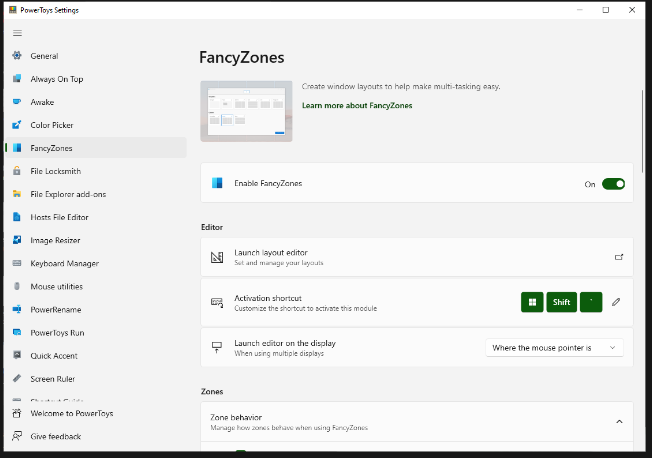
FancyZones serves as a window management tool designed to help users arrange and snap their application windows into optimized layouts, enhancing workflow efficiency and allowing for quick restoration of these layouts. This utility empowers you to specify a series of designated zones on your desktop where windows can be directed. By dragging a window into a predetermined zone or using a designated keyboard shortcut, the respective window automatically resizes and relocates to occupy that zone completely. Additionally, if you have the "Use non-primary mouse button to toggle zone activation" option activated, you can enter zone selection mode by simply clicking the secondary mouse button. When two zones are positioned next to each other, a window can be adjusted to span the combined area of both zones, effectively rounding up to the smallest rectangle that encompasses the two. As you maneuver the mouse cursor close to the shared boundary of two zones, both zones become active at the same time, giving you the flexibility to drop the window into either or both. Moreover, you can drag the window until it activates one zone and then, by pressing and holding the control key while continuing to drag, select multiple zones to expand your layout options. This feature significantly streamlines the process of organizing your desktop workspace efficiently.
API Access
Has API
API Access
Has API


Integrations
No details available.
Integrations
No details available.
Pricing Details
$1 per month
Free Trial
Free Version
Pricing Details
Free
Free Trial
Free Version
Deployment
Web-Based
On-Premises
iPhone App
iPad App
Android App
Windows
Mac
Linux
Chromebook
Deployment
Web-Based
On-Premises
iPhone App
iPad App
Android App
Windows
Mac
Linux
Chromebook
Customer Support
Business Hours
Live Rep (24/7)
Online Support
Customer Support
Business Hours
Live Rep (24/7)
Online Support
Types of Training
Training Docs
Webinars
Live Training (Online)
In Person
Types of Training
Training Docs
Webinars
Live Training (Online)
In Person
Vendor Details
Company Name
Ascent Technology
Founded
1986
Country
United States
Website
www.ascent.com
Vendor Details
Company Name
Microsoft
Country
United States
Website
learn.microsoft.com/en-us/windows/powertoys/fancyzones
Product Features
Workforce Management
Budgeting & Forecasting
Contractor Management
Employee Lifecycle Management
Labor Projection
Performance Appraisal
Recruiting Management
Scheduling
Skills Tracking
Time & Attendance
Variable Workforce



